Helm
- Helm 소개
- Helm은 템플릿 기반 쿠버네티스 패키지 관리자로, 버전 관리와 공유, 배포 가능한 아티팩트를 생성함
- YAML 파일에 Go 템플릿을 적용해 쿠버네티스 애플리케이션을 설치·관리하는 도구
- 핵심 포인트
- Helm은 Kustomize와 유사하지만 템플릿 기반으로 더 유연함
- **차트(chart)**는 재사용·공유 가능한 쿠버네티스 패키지 단위
- ConfigMap 변경 시 자동으로 애플리케이션 재배포를 지원해 관리 효율성 향상
Helm 프로젝트 만들기
helm은 관련 매니페스트 파일을 번들로 묶어 하나의 논리적 배포 단위인 차트로 패키징
차트 만들기
Chart.yaml 파일 작성
cat << EOF > Chart.yaml
apiVersion: v2
name: pacman
description: A Helm chart for Pacman
type: application
version: 0.1.0        # 차트 버전, 차트 정의가 바뀌면 업데이트한다
appVersion: "1.0.0"   # 애플리케이션 버전
EOF
template 작성 - deployment
cat << EOF > templates/deployment.yaml
apiVersion: apps/v1
kind: Deployment
metadata:
  name: {{ .Chart.Name}}            # Chart.yaml 파일에 설정된 이름을 가져와 설정
  labels:
    app.kubernetes.io/name: {{ .Chart.Name}}
    {{- if .Chart.AppVersion }}     # Chart.yaml 파일에 appVersion 여부에 따라 버전을 설정
    app.kubernetes.io/version: {{ .Chart.AppVersion | quote }}     # appVersion 값을 가져와 지정하고 따움표 처리
    {{- end }}
spec:
  replicas: {{ .Values.replicaCount }}     # replicaCount 속성을 넣을 자리 placeholder
  selector:
    matchLabels:
      app.kubernetes.io/name: {{ .Chart.Name}}
  template:
    metadata:
      labels:
        app.kubernetes.io/name: {{ .Chart.Name}}
    spec:
      containers:
        - image: "{{ .Values.image.repository }}:{{ .Values.image.tag | default .Chart.AppVersion}}"   # 이미지 지정 placeholder, 이미지 태그가 있으면 넣고, 없으면 Chart.yaml에 값을 설정
          imagePullPolicy: {{ .Values.image.pullPolicy }}
          securityContext:
            {{- toYaml .Values.securityContext | nindent 14 }} # securityContext의 값을 YAML 객체로 지정하며 14칸 들여쓰기
          name: {{ .Chart.Name}}
          ports:
            - containerPort: {{ .Values.image.containerPort }}
              name: http
              protocol: TCP
EOF
service작성
cat << EOF > templates/service.yaml
apiVersion: v1
kind: Service
metadata:
  labels:
    app.kubernetes.io/name: {{ .Chart.Name }}
  name: {{ .Chart.Name }}
spec:
  ports:
    - name: http
      port: {{ .Values.image.containerPort }}
      targetPort: {{ .Values.image.containerPort }}
  selector:
    app.kubernetes.io/name: {{ .Chart.Name }}
EOF
차트 기본 values.yaml 작성
cat << EOF > values.yaml
image:     # image 절 정의
  repository: quay.io/gitops-cookbook/pacman-kikd
  tag: "1.0.0"
  pullPolicy: Always
  containerPort: 8080

replicaCount: 1
securityContext: {}     # securityContext 속성의 값을 비운다
EOF
Helm Chart를 로컬에서 YAML로 렌더링
helm template .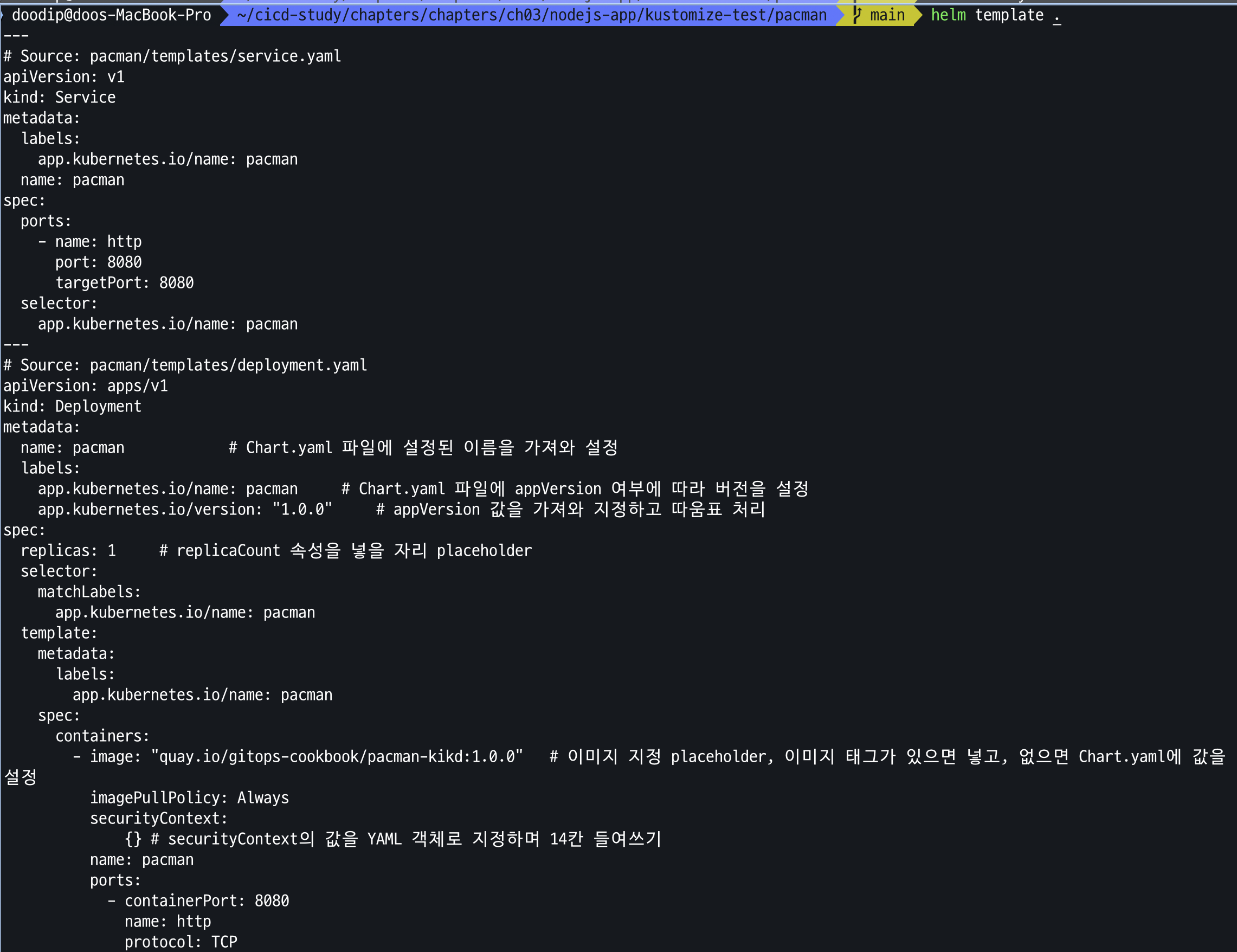
--set 파라미터를 이용하여 기본값을 재정의
helm template --set replicaCount=3 .차트를 배포
helm install pacman .
helm list
배포된 리소스 확인
kubectl get deploy,pod,svc,ep
kubectl get pod -o yaml | kubectl neat | yq  # kubectl krew install neat
kubectl get pod -o json | grep securityContext -A1
Helm upgrade
helm upgrade pacman --reuse-values --set replicaCount=2 .Helm 삭제
helm uninstall pacman
여러 파일에서 같은 템플릿 코드를 재사용
deployment.yml, service.yml 의 selector 필드가 동일
spec:
  replicas: {{ .Values.replicaCount }}
  selector:
    matchLabels:
      app.kubernetes.io/name: {{ .Chart.Name}}
  template:
    metadata:
      labels:
        app.kubernetes.io/name: {{ .Chart.Name}}

## service.yaml
  selector:
    app.kubernetes.io/name: {{ .Chart.Name }}
_helpers.tpl 파일 작성
cat << EOF > templates/_helpers.tpl
{{- define "pacman.selectorLabels" -}}   # stetement 이름을 정의
app.kubernetes.io/name: {{ .Chart.Name}} # 해당 stetement 가 하는 일을 정의
{{- end }}
EOF
deplyoment,service yaml 수정
## deployment.yaml 수정
spec:
  replicas: {{ .Values.replicaCount }}
  selector:
    matchLabels:
      {{- include "pacman.selectorLabels" . | nindent 6 }}   # pacman.selectorLabels를 호출한 결과를 6만큼 들여쓰기하여 주입
  template:
    metadata:
      labels:
        {{- include "pacman.selectorLabels" . | nindent 8 }} # pacman.selectorLabels를 호출한 결과를 8만큼 들여쓰기하여 주입

## service.yaml 수정
  selector:
    {{- include "pacman.selectorLabels" . | nindent 6 }}
Helm template 로 변경된 차트 렌더링 확인
helm template .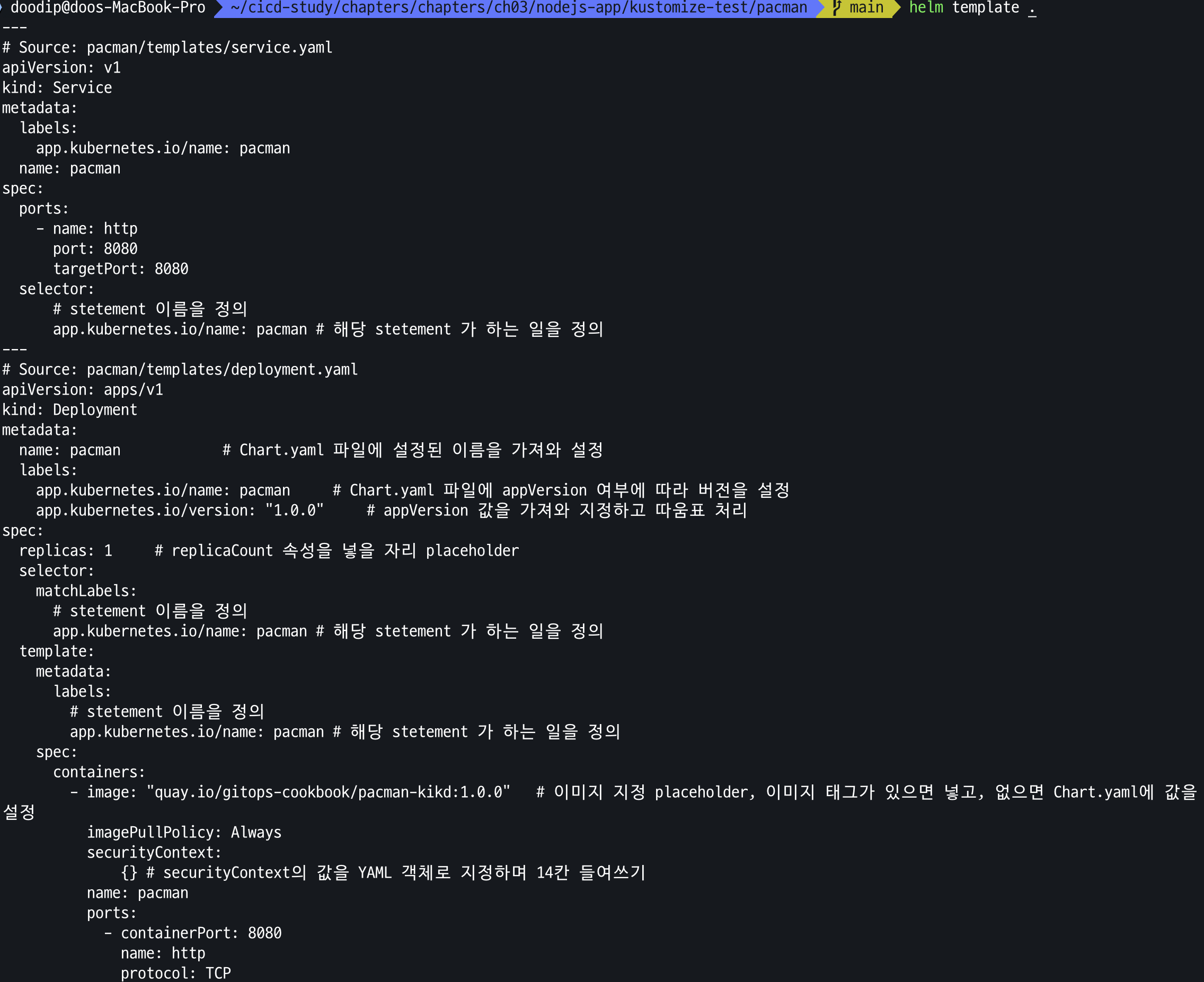
Updating a Container Image in Helm
배포 파일에서 컨테이너 이미지 갱신 후 인스턴스 업그레이드
image 1.0.0 -> 1.1.0 으로 이미지 갱신
values.yaml 변경
# values.yaml 에 이미지 태그 업데이트
cat << EOF > values.yaml
image:
  repository: quay.io/gitops-cookbook/pacman-kikd
  tag: "1.1.0"
  pullPolicy: Always
  containerPort: 8080

replicaCount: 1
securityContext: {}
EOF
Chart.yaml appVersion 필드 갱신
cat << EOF > Chart.yaml
apiVersion: v2
name: pacman
description: A Helm chart for Pacman
type: application
version: 0.1.0
appVersion: "1.1.0"
EOF
Helm upgrade
helm upgrade pacman .확인
helm history pacman이전 버전으로 롤백
helm history pacman
helm rollback pacman 1 && kubectl get pod -w
values YAML 파일 override
cat << EOF > newvalues.yaml
image:
  tag: "1.2.0"
EOF
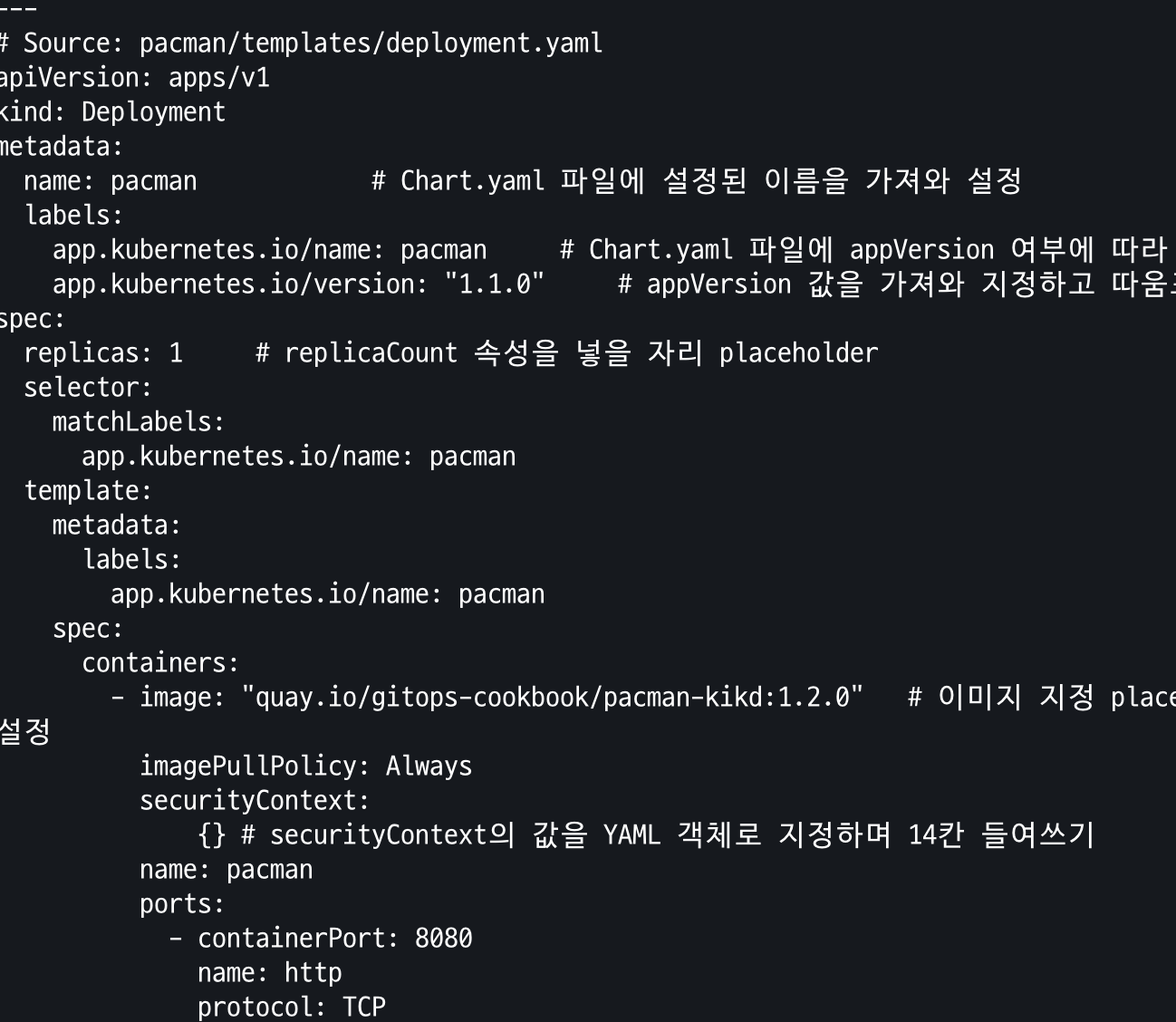
new value 파일 적용하여 설치
helm template pacman -f newvalues.yaml .이미지 변경 확인
Repo에서 차트 배포하기
repo add
helm repo add bitnami https://charts.bitnami.com/bitnami
helm repo list
helm search repo postgresql
helm search repo postgresql -o json | jq
배포 후 확인
helm install my-db \
--set postgresql.postgresqlUsername=my-default,postgresql.postgresqlPassword=postgres,postgresql.postgresqlDatabase=mydb,postgresql.persistence.enabled=false \
bitnami/postgresql
helm list
helm 삭제
helm uninstall my-db
다른 차트를 의존성으로 사용하는 차트를 배포
chart deplyoment.yaml 생성
cat << EOF > templates/deployment.yaml
apiVersion: apps/v1
kind: Deployment
metadata:
  name: {{ .Chart.Name}}
  labels:
    app.kubernetes.io/name: {{ .Chart.Name}}
    {{- if .Chart.AppVersion }}
    app.kubernetes.io/version: {{ .Chart.AppVersion | quote }}
    {{- end }}
spec:
  replicas: {{ .Values.replicaCount }}
  selector:
    matchLabels:
      app.kubernetes.io/name: {{ .Chart.Name}}
  template:
    metadata:
      labels:
        app.kubernetes.io/name: {{ .Chart.Name}}
    spec:
      containers:
        - image: "{{ .Values.image.repository }}:{{ .Values.image.tag | default .Chart.AppVersion}}"
          imagePullPolicy: {{ .Values.image.pullPolicy }}
          name: {{ .Chart.Name}}
          ports:
            - containerPort: {{ .Values.image.containerPort }}
              name: http
              protocol: TCP
          env:
            - name: QUARKUS_DATASOURCE_JDBC_URL
              value: {{ .Values.postgresql.server | default (printf "%s-postgresql" ( .Release.Name )) | quote }}
            - name: QUARKUS_DATASOURCE_USERNAME
              value: {{ .Values.postgresql.postgresqlUsername | default (printf "postgres" ) | quote }}
            - name: QUARKUS_DATASOURCE_PASSWORD
              valueFrom:
                secretKeyRef:
                  name: {{ .Values.postgresql.secretName | default (printf "%s-postgresql" ( .Release.Name )) | quote }}
                  key: {{ .Values.postgresql.secretKey }}
EOF
service.yaml
at << EOF > templates/service.yaml
apiVersion: v1
kind: Service
metadata:
  labels:
    app.kubernetes.io/name: {{ .Chart.Name }}
  name: {{ .Chart.Name }}
spec:
  ports:
    - name: http
      port: {{ .Values.image.containerPort }}
      targetPort: {{ .Values.image.containerPort }}
  selector:
    app.kubernetes.io/name: {{ .Chart.Name }}
EOF
Chart.yaml
cat << EOF > Chart.yaml
apiVersion: v2
name: music
description: A Helm chart for Music service
type: application
version: 0.1.0
appVersion: "1.0.0"
dependencies:
  - name: postgresql
    version: 10.16.2
    repository: "https://charts.bitnami.com/bitnami"
EOF
postgresql repo search
helm search repo postgresql현재 최신 차트 버전 사용
cat << EOF > Chart.yaml
apiVersion: v2
name: music
description: A Helm chart for Music service
type: application
version: 0.1.0
appVersion: "1.0.0"
dependencies:
  - name: postgresql
    version: 18.0.17 # book 10.16.2
    repository: "https://charts.bitnami.com/bitnami"
EOF
values.yaml 생성
cat << EOF > values.yaml
image:
  repository: quay.io/gitops-cookbook/music
  tag: "1.0.0"
  pullPolicy: Always
  containerPort: 8080

replicaCount: 1

postgresql:
  server: jdbc:postgresql://music-db-postgresql:5432/mydb
  postgresqlUsername: my-default
  postgresqlPassword: postgres
  postgresqlDatabase: mydb
  secretName: music-db-postgresql
  secretKey: postgresql-password
EOF
의존성으로 선언된 차트를 다운로드 하여 차트 디렉토리 업데이트
helm dependency updatedependency 차트 확인
tree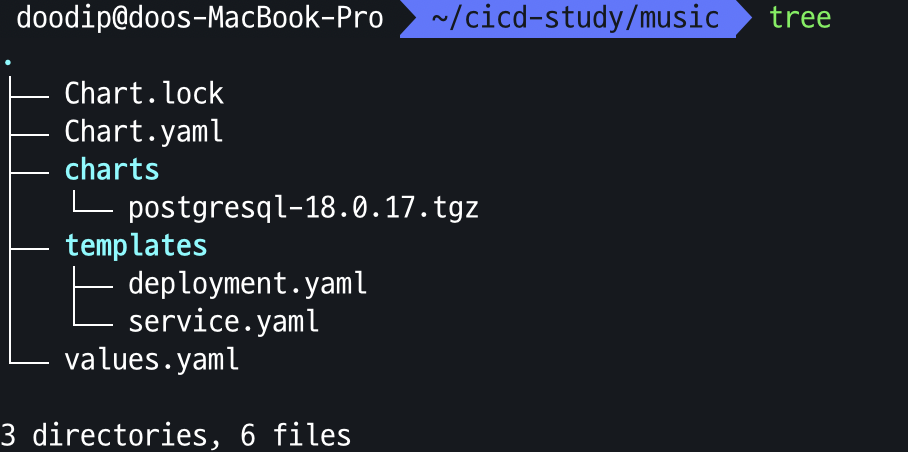
차트 배포
helm install music-db .확인
kubectl get sts,pod,svc,ep,secret,pv,pvc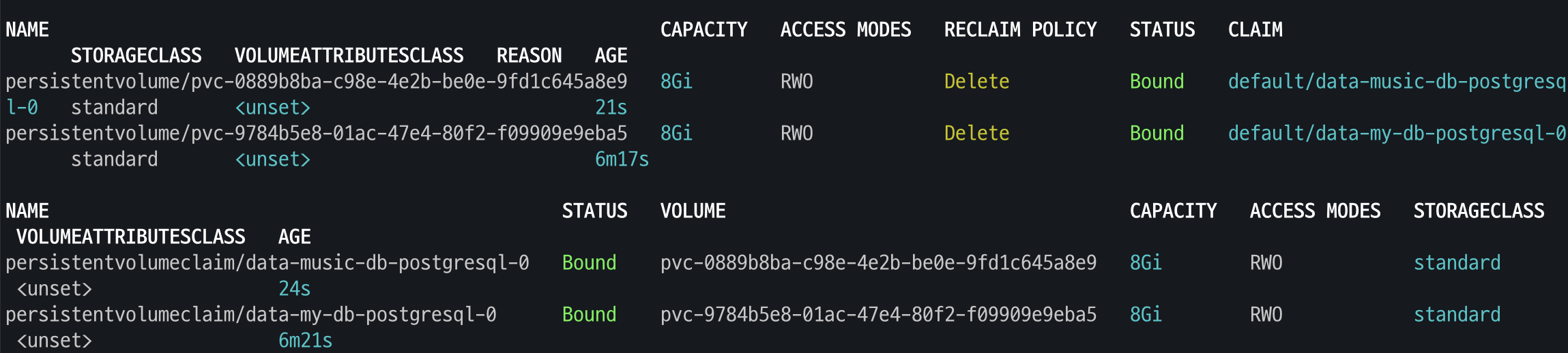
ConfigMap 이 업데이트 될때 deployment 가 자동으로 시작되도록 구성
- Kustomize는 ConfigMapGenerator를 사용해 ConfigMap 이름에 해시를 자동 추가하고, Deployment가 그 값을 참조해 변경 시 자동 업데이트되도록 함
- Helm은 이와 달리 모든 파일의 SHA-256 해시를 계산해 템플릿에 포함시키는 템플릿 함수로 동일한 효과를 냄
Deployment 파일 예시
configmap.yaml 파일 콘텐츠의 SHA-256 값을 계산하여 Pod annotations으로 설정
이루 configmap 변경 후 helm upgrade 시 Rolling Update 실행
spec:
  replicas: {{ .Values.replicaCount }}
  selector:
    matchLabels:
      app.kubernetes.io/name: {{ .Chart.Name}}
template:
  metadata:
    labels:
      app.kubernetes.io/name: {{ .Chart.Name}}
  annotations:
    checksum/config: {{ include (print $.Template.BasePath "/configmap.yaml"). | sha256sum }}
Cloud Native CI/CD
Tekton
- Tekton은 쿠버네티스 기반 오픈소스 CI/CD 시스템으로, 확장 모듈 형태로 설치되며 Task·Pipeline 등의 CRD를 통해 선언적으로 파이프라인을 정의
- Trigger를 사용해 웹훅 등 이벤트로부터 파이프라인을 자동 실행 가능
- 빌드 도구(Buildah, Shipwright 등)로 아티팩트나 컨테이너 이미지를 생성
- Helm·Kustomize와 연동해 쿠버네티스 중심의 동적 CI 구성 가능
- Tekton은 범용 쿠버네티스 네이티브 솔루션이지만, GitHub Actions 등 다른 GitOps 기반 CI/CD 도구도 존재
텍톤 구성요소
- Tekton Pipelines: Tekton의 핵심 구성요소로, CI/CD 파이프라인을 정의하는 Kubernetes 커스텀 리소스(CRD) 제공
- Tekton Triggers: GitHub PR 병합 등 이벤트 기반으로 파이프라인 실행을 자동화
- Tekton CLI (tkn): Kubernetes CLI 기반의 명령줄 도구로 Tekton 리소스 관리 지원
- Tekton Dashboard: 파이프라인 실행 상태를 시각화하는 웹 UI, 현재 개발 중
- Tekton Catalog: 커뮤니티가 만든 Task·Pipeline 템플릿 모음집으로 재사용 가능
- Tekton Hub: Tekton Catalog에 접근할 수 있는 웹 인터페이스
- Tekton Operator: Tekton 구성요소를 설치·업데이트·제거하는 Kubernetes 오퍼레이터
- Tekton Chains: Tekton 파이프라인이 생성한 아티팩트의 서명과 출처 검증을 담
Tekton Task 만들기
task 생성
cat << EOF | kubectl apply -f -
apiVersion: tekton.dev/v1
kind: Task
metadata:
  name: hello
spec:
  steps:
    - name: echo    # step 이름
      image: alpine # step 수행 컨테이너 이미지
      script: |
        #!/bin/sh
        echo "Hello World"
EOF
task 확인
tkn task list
task run
tkn task start --showlog hellotask running 확인

Git 저장소에 보관된 앱 코드를 컴파일하고 패키징 작업
tekton task 작성
cat << EOF | kubectl apply -f -
apiVersion: tekton.dev/v1
kind: Pipeline
metadata:
  name: clone-read
spec:
  description: |
    This pipeline clones a git repo, then echoes the README file to the stout.
  params:     # 매개변수 repo-url
  - name: repo-url
    type: string
    description: The git repo URL to clone from.
  workspaces: # 다운로드할 코드를 저장할 공유 볼륨인 작업 공간을 추가
  - name: shared-data
    description: |
      This workspace contains the cloned repo files, so they can be read by the
      next task.
  tasks:      # task 정의
  - name: fetch-source
    taskRef:
      name: git-clone
    workspaces:
    - name: output
      workspace: shared-data
    params:
    - name: url
      value: \$(params.repo-url)
EOF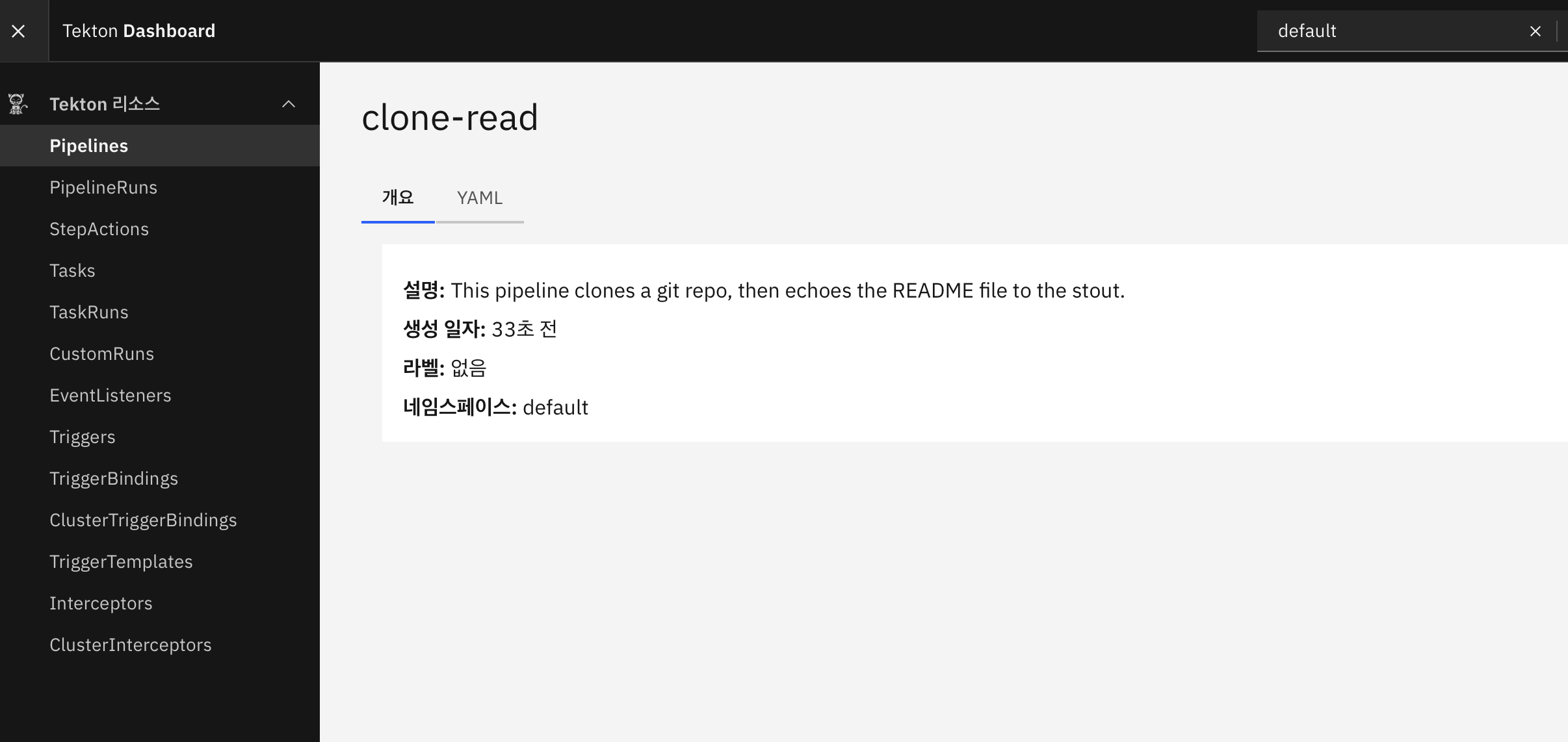
params.repo-url 로 설정한 변수를 주입하여 실행
cat << EOF | kubectl create -f -
apiVersion: tekton.dev/v1
kind: PipelineRun
metadata:
  generateName: clone-read-run-
spec:
  pipelineRef:
    name: clone-read
  taskRunTemplate:
    podTemplate:
      securityContext:
        fsGroup: 65532
  workspaces: # 작업 공간 인스턴스화, PVC 생성
  - name: shared-data
    volumeClaimTemplate:
      spec:
        accessModes:
        - ReadWriteOnce
        resources:
          requests:
            storage: 1Gi
  params:    # 저장소 URL 매개변수 값 설정
  - name: repo-url
    value: https://github.com/tektoncd/website
EOF
GitClone 실패

클러스터에 git clone 작업을 사용하기 위해 설치
tkn hub install task git-clone추가 tasks 확인
kubectl get tasks
파이프라인 재실행
cat << EOF | kubectl create -f -
apiVersion: tekton.dev/v1
kind: PipelineRun
metadata:
  generateName: clone-read-run-
spec:
  pipelineRef:
    name: clone-read
  taskRunTemplate:
    podTemplate:
      securityContext:
        fsGroup: 65532
  workspaces:
  - name: shared-data
    volumeClaimTemplate:
      spec:
        accessModes:
        - ReadWriteOnce
        resources:
          requests:
            storage: 1Gi
  params:
  - name: repo-url
    value: https://github.com/tektoncd/website
EOF
tasks 확인

비공개 Git 저장소 앱 컴파일하고 패키징
- 텍톤은 Git 을 위해 2가지 인증 체계를 지원 : Basic-auth, SSH
- 2가지 옵션 모두 쿠버네티스 Secret 를 사용하여 자격 증명을 저장하고, 이를 텍톤 Task 또는 Pipeline 을 실행하는 ServiceAccount 에 연결
Tekton Pipelines를 사용하여 git. 에서 소스코드를 복제
cat << EOF | kubectl apply -f -
apiVersion: v1
kind: Secret
metadata:
  name: git-credentials
data:
  id_rsa: $SSHPK
  known_hosts: $SSHKH
EOF
serviceAccount 에 secret 속성 지정
cat << EOF | kubectl apply -f -
apiVersion: v1
kind: ServiceAccount
metadata:
  name: build-bot
secrets:
  - name: git-credentials
EOF
파이프라인 파일 작성
cat << EOF | kubectl apply -f -
apiVersion: tekton.dev/v1
kind: Pipeline
metadata:
  name: my-clone-read
spec:
  description: |
    This pipeline clones a git repo, then echoes the README file to the stout.
  params:     # 매개변수 repo-url
  - name: repo-url
    type: string
    description: The git repo URL to clone from.
  workspaces: # 다운로드할 코드를 저장할 공유 볼륨인 작업 공간을 추가
  - name: shared-data
    description: |
      This workspace contains the cloned repo files, so they can be read by the
      next task.
  - name: git-credentials
    description: My ssh credentials
  tasks:      # task 정의
  - name: fetch-source
    taskRef:
      name: git-clone
    workspaces:
    - name: output
      workspace: shared-data
    - name: ssh-directory
      workspace: git-credentials
    params:
    - name: url
      value: \$(params.repo-url)
  - name: show-readme # add task
    runAfter: ["fetch-source"]
    taskRef:
      name: show-readme
    workspaces:
    - name: source
      workspace: shared-data
EOF
task 확인
tkn pipeline list
tkn pipeline describe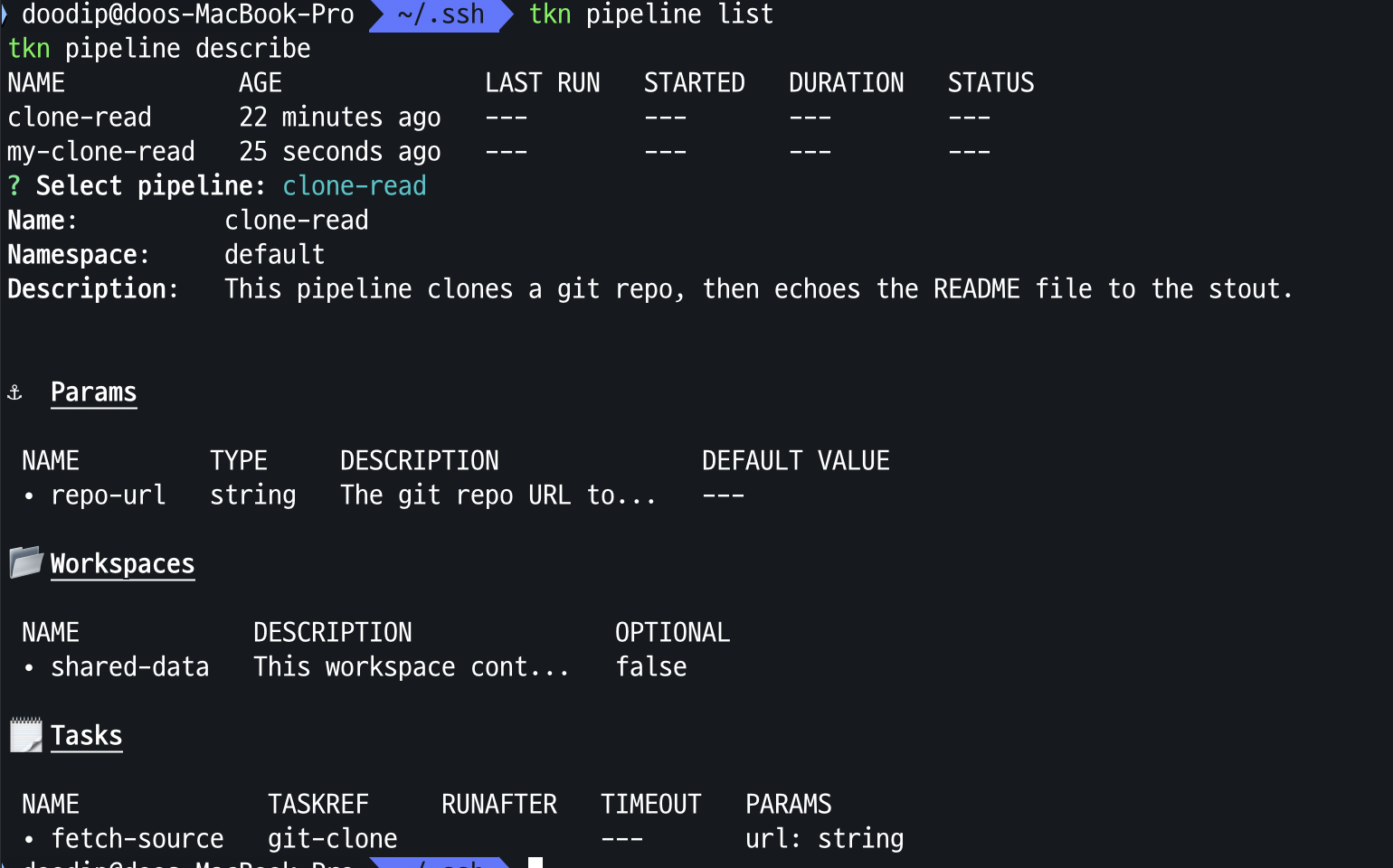
show-readm task 생성
cat << EOF | kubectl apply -f -
apiVersion: tekton.dev/v1
kind: Task
metadata:
  name: show-readme
spec:
  description: Read and display README file.
  workspaces:
  - name: source
  steps:
  - name: read
    image: alpine:latest
    script: |
      #!/usr/bin/env sh
      cat \$(workspaces.source.path)/readme.md
EOF
파이프라인 실행
cat << EOF | kubectl create -f -
apiVersion: tekton.dev/v1
kind: PipelineRun
metadata:
  generateName: clone-read-run-
spec:
  pipelineRef:
    name: my-clone-read
  taskRunTemplate:
    serviceAccountName: build-bot
    podTemplate:
      securityContext:
        fsGroup: 65532
  workspaces:
  - name: shared-data
    volumeClaimTemplate:
      spec:
        accessModes:
        - ReadWriteOnce
        resources:
          requests:
            storage: 1Gi
  - name: git-credentials
    secret:
      secretName: git-credentials
  params:
  - name: repo-url
    value: git@github.com:gasida/my-sample-app.git # 제가 사용하는 것 or 자신의 private repo 지정
EOF
텍톤 Task를 사용하여 앱 컴파일, 패키징, 컨테이너 이미지 생성까지의 과정을 처리
task 설치
tkn hub install task kaniko
kubectl get tasks
kubectl get tasks kaniko -o yaml | k neat | yq
docker credential 생성
auth: 개인 repo username, password 값으로 생성
# ~/.docker/config.json 대신 임시 파일 dsh.txt 작성
vi dsh.txt
{
  "auths": {
    "https://index.docker.io/v1/": {
      "auth": "AXDFGHXXCFGFGF"
    }
  }
}
생성한 auth를 통해 secret 생성
DSH=$(cat dsh.txt | base64 -w0)
echo $DSH
-------------------------------------------------


# 여기서 부터는 공통 적용 내용
cat << EOF | kubectl apply -f -
apiVersion: v1
kind: Secret
metadata:
  name: docker-credentials
data:
  config.json: $DSH
EOF
ServiceAccount 생성 및 Secret 연결
kubectl create sa build-sa
kubectl patch sa build-sa -p '{"secrets": [{"name": "docker-credentials"}]}'
kubectl get sa build-sa -o yaml | kubectl neat | yq
파이프라인 작성
# 파이프라인 파일 작성
cat << EOF | kubectl apply -f -
apiVersion: tekton.dev/v1
kind: Pipeline
metadata:
  name: clone-build-push
spec:
  description: |
    This pipeline clones a git repo, builds a Docker image with Kaniko and pushes it to a registry
  params:
  - name: repo-url
    type: string
  - name: image-reference
    type: string
  workspaces:
  - name: shared-data
  - name: docker-credentials
  tasks:
  - name: fetch-source
    taskRef:
      name: git-clone
    workspaces:
    - name: output
      workspace: shared-data
    params:
    - name: url
      value: \$(params.repo-url)
  - name: build-push
    runAfter: ["fetch-source"]
    taskRef:
      name: kaniko
    workspaces:
    - name: source
      workspace: shared-data
    - name: dockerconfig
      workspace: docker-credentials
    params:
    - name: IMAGE
      value: \$(params.image-reference)
EOF
파이프라인 실행
cat << EOF | kubectl create -f -
apiVersion: tekton.dev/v1
kind: PipelineRun
metadata:
  generateName: clone-build-push-run-
spec:
  pipelineRef:
    name: clone-build-push
  taskRunTemplate:
    serviceAccountName: build-sa
    podTemplate:
      securityContext:
        fsGroup: 65532
  workspaces:
  - name: shared-data
    volumeClaimTemplate:
      spec:
        accessModes:
        - ReadWriteOnce
        resources:
          requests:
            storage: 1Gi
  - name: docker-credentials
    secret:
      secretName: docker-credentials
  params:
  - name: repo-url
    value: https://github.com/gasida/docsy-example.git  # 유형욱님이 제보해주신 대로 Dockerfile 에 USER root 추가해두었습니다
  - name: image-reference
    value: docker.io/gasida/docsy:1.0.0    # 각자 자신의 저장소
EOF
pipeline 결과 확인
